Browse Items (37 total)
Sort by:
-
DSC Lights Operation - Staff Training Video
The video explains how to properly operate lighting effects during a mission, focusing on when to use blue lights, red lights, and red + rotating lights. It covers how to transition cleanly between red alert and blue lights, especially using the “secure” sound cue. The instructor also demonstrates how to simulate explosions by shaking rope lights correctly and timing the movement with the explosion sound. Additional guidance is given on using the strobe light briefly to create spark-like effects rather than prolonged flashing. Overall, the training emphasizes realism, proper timing, and coordination with the flight director. -
DSC Hand Training - Staff Training Video
This training video explains what hand training is, and how to properly hand train. It goes over several methods that are incorrect, or poor hand training practices. It then goes over what a good hand training looks like, and the best methods of training a crew member by hand. -
DSC Damage Report Creation - Staff Training Video
This training video walks viewers through how to correctly create and edit damage reports on the Atlantis bridge computer system. It demonstrates how to access the programming folders, duplicate an existing report, and rename it properly so the system can recognize it. The trainer emphasizes the importance of accurate spelling, simple yet engaging language, and ensuring that each step in the report corresponds to an action that a station can actually perform. The video also explains how to design clear, logical repair steps, including creating damage-control teams and verifying station capabilities before assigning tasks. Finally, it offers general tips for consistency, readability, and using existing reports as models to produce professional, functional damage reports. -
DSC Computer Screens Setup - Staff Training Video
The training video provides step-by-step instructions for setting up the control room computer screens when they are not displaying properly. It demonstrates how to adjust display properties, extend the desktop to the correct monitor, and use the switcher to ensure the main screen shows the computer. The video also guides viewers on opening media files, moving them to the external monitor, and setting them to full screen for proper visibility. Alternative instructions are mentioned but may not be as reliable as the method shown. Overall, it emphasizes carefully following these steps to ensure the computer screens function correctly on the main display. -
DSC Cameras Setup - Staff Training Video
The training video demonstrates how to set up and operate the security camera system on the Atlantis (with the process being the same on the Colombia). It covers logging into the computer, ignoring minor errors, and selecting the correct program, Live Client, to view live camera feeds rather than previously recorded footage. The instructor shows how to log in using the default admin credentials, navigate camera views, and adjust the display layout, including full-screen mode. The video emphasizes the importance of keeping the system running during missions to monitor the crew and ensure safe operations. -
DSC Away Missions Setup - Staff Training Video
The video explains the setup and considerations for “away missions,” which are activities conducted outside of the main ship. It emphasizes safety for both crew and equipment, proper lighting depending on the time of day, and ensuring the environment is appropriately arranged. The demonstration shows an away mission setup completed in just over three minutes due to prior familiarity. Viewers are advised to clearly communicate their requirements to staff when organizing an away mission, specifying location and expected conditions. Overall, the training highlights efficiency, preparation, and safety in mission planning. -
Discovery Space Center Supervisor Training Site
The site “Discovery Supervisors” provides a collection of training resources for people working as supervisors — including mission scripts, station computer trainings, basic vocabulary references, and video tutorials. It’s designed to help new or developing supervisors learn the skills they need and offers updates over time for ongoing support. -
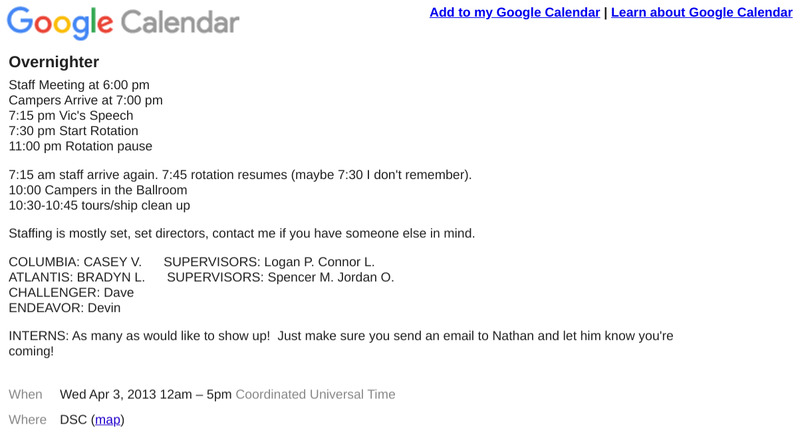
Discovery Overnighter Schedule
This is an example of an schedule for an Overnighter Camp at the Discovery Space Center. This particular schedule is -
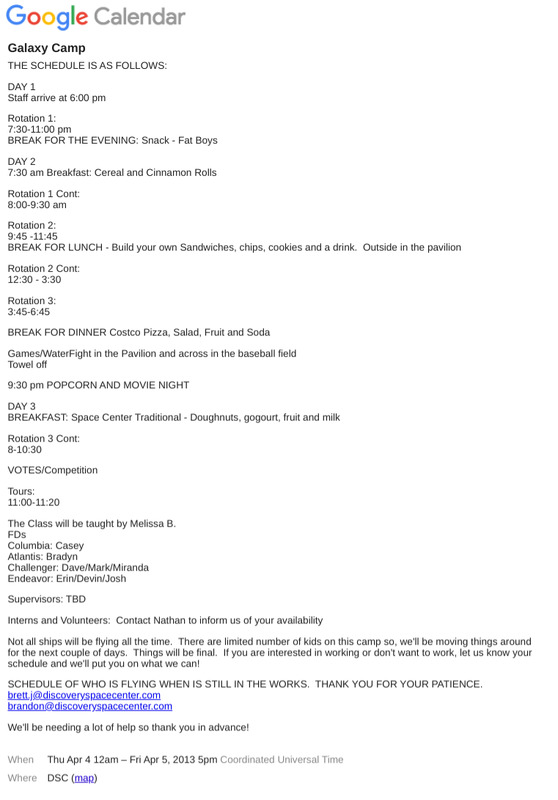
Discovery Galaxy Camp Schedule
This is an example schedule of a Galaxy Camp held at Discovery Space Center early on in it's operation. -
Columbia Ship Shutdown - Staff Training Video
The video explains the full shutdown and cleanup procedure for the Columbia after a mission. It walks through resetting and powering down all station computers, including tactical, security, and sound systems, as well as turning off speakers, smoke machines, and related equipment. The presenter then details how to tidy the control room and bridge by organizing chairs, uniforms, props, and clearing trash. Additional steps include shutting off the engineering panel and ensuring everything is neat and ready for the next crew. Finally, after all cleanup is complete, the lights are turned off to finish the process.