Browse Items (37 total)
Sort by:
-
Atlantis Sensor Scanners Station - Staff Training Video
The training video explains how to use the sensor scanner screen on a ship. The sensor officer can scan outside the ship to gather information about other vessels, such as the number of ships, crew, and weapons. Users type what they want to scan for, click the scan button, and the results are displayed, ranging from “none detected” to specific weapon details. Any critical information should be communicated to the captain or admiral. Crew members are encouraged to experiment with scans freely, as failed scans do not cause any harm to the system. -
Atlantis Ship Setup - Staff Training Video
The video provides a step-by-step walkthrough for powering up and preparing the Atlantis simulator, beginning with turning on all necessary computers in the control room, including flight director stations, tactical computer, security cameras, and sound equipment. The presenter then demonstrates how to activate lighting, audio components, and various ship systems before heading downstairs to power on all bridge computers and TVs. After loading the correct station software and ensuring all network connections are active, they emphasize cleaning and organizing the bridge. Finally, back in the control room, the instructor shows how to start the entire ship from the flight director computer and load the appropriate tactical program for the mission. -
Atlantis Ship Shutdown - Staff Training Video
The video explains the full shutdown procedure after a mission, walking through how to reset and power down all stations, computers, and sound equipment in the control room. It demonstrates quitting tactical and sound applications, turning off speakers, voice changers, and shutting down designated computers while leaving others on for the next mission. The trainer also covers cleaning responsibilities, such as putting away costumes, removing stray papers, and organizing chairs and uniforms. Finally, it shows how to turn off TVs, tidy the ship area, and switch off the control-room lights to complete the shutdown process. -
Atlantis Telephone Station - Staff Training Video
This video provides a detailed walkthrough of the communications telephone station aboard a ship. It demonstrates how the officer in charge manages both internal and external calls, including connecting to main speakers, making ship-wide announcements and contacting personnel on specific rooms or decks. The video also explains technical aspects such as amplitude, frequency, and phase settings for external communications, as well as the use of intercom features for phone conversations within the ship. -
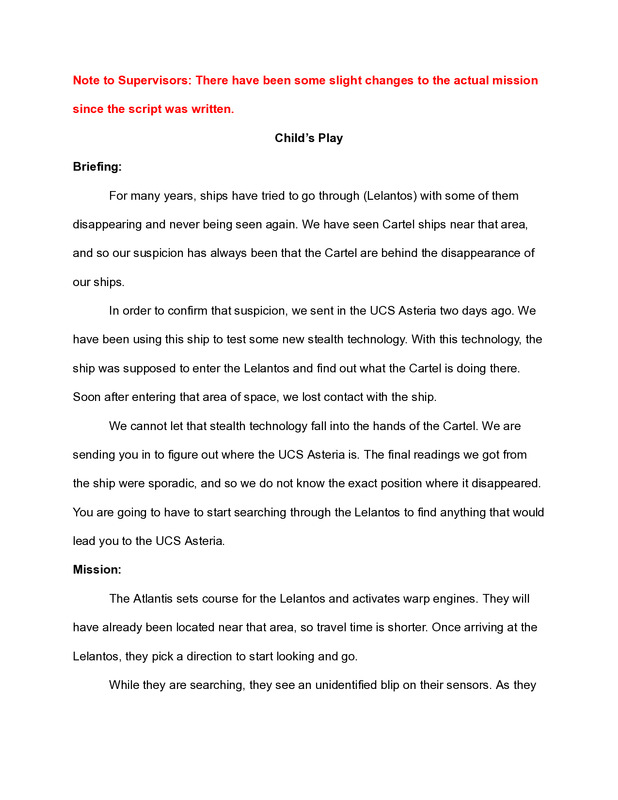
Child's Play Script, cir. 2013
This PDF outlines a mission script for Discovery Space Center Supervisors in which a crew investigates the disappearance of the UCS Asteria and becomes trapped inside an advanced alien testing facility disguised as a space mission. The scenario unfolds over three escalating stages—physical combat, mental riddles under threat, and a strategic maze—designed to test teamwork, leadership, problem-solving, and ethical decision-making under pressure. The mission culminates in a moral dilemma and coordinated technical challenge, emphasizing supervision skills, crew coordination, and adaptability in high-stress, story-driven environments. -
Columbia Medical Chief Station - Staff Training Video
The training video explains the functions of the medical chief’s station on the ship Columbia. It covers how the medical officer can deploy teams to respond to emergencies, specifying the number of doctors and nurses needed for situations like fires or injured crew members. The video also emphasizes the importance of the messaging system for communication between the medical officer and teams in the field or sick bay. Finally, it demonstrates the parts control screen, which allows the officer to send medical supplies, such as kits or sanitation items, to different locations on the ship. Overall, the video highlights coordination, communication, and resource management in shipboard medical operations. -
Columbia Ship Setup - Staff Training Video
The video explains the step-by-step process for powering up the Columbia simulator before a mission. It covers turning on all required computers in the control room, including flight director, second chair, video, sound, and camera systems. The presenter then demonstrates how to power up bridge computers, TVs, lights, and special equipment like rope lights and the smoke machine. The process also includes launching the ship’s software, verifying systems such as tacticals and microphones, and ensuring all stations are clean, organized, and ready for the crew. Once everything is running and the bridge is set, the ship is ready for the mission to begin. -
Columbia Ship Shutdown - Staff Training Video
The video explains the full shutdown and cleanup procedure for the Columbia after a mission. It walks through resetting and powering down all station computers, including tactical, security, and sound systems, as well as turning off speakers, smoke machines, and related equipment. The presenter then details how to tidy the control room and bridge by organizing chairs, uniforms, props, and clearing trash. Additional steps include shutting off the engineering panel and ensuring everything is neat and ready for the next crew. Finally, after all cleanup is complete, the lights are turned off to finish the process. -
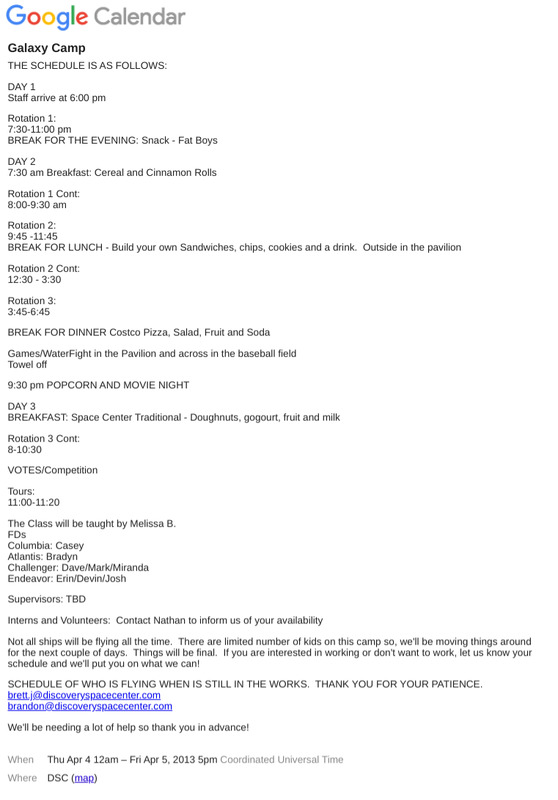
Discovery Galaxy Camp Schedule
This is an example schedule of a Galaxy Camp held at Discovery Space Center early on in it's operation. -
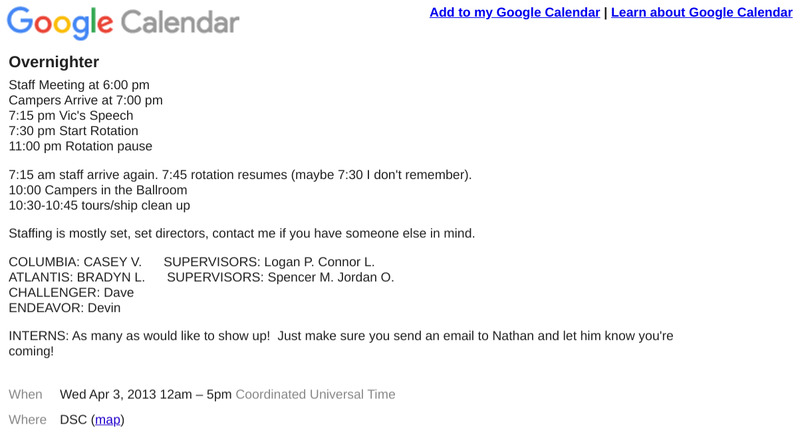
Discovery Overnighter Schedule
This is an example of an schedule for an Overnighter Camp at the Discovery Space Center. This particular schedule is